



Is your monthly subscription bill for AI tools spiraling out of control? From Midjourney to 11 Labs and Zapier, the “AI tax” adds up quickly. But what if you could replace your entire tech stack with high-end tools—for absolutely zero dollars?
Google has quietly released a suite of experimental AI platforms that don’t just compete with paid software; in many cases, they destroy them. Here are the seven free Google AI tools you need to start using today.
1. AI Studio Build: Your No-Code Developer
Located at aistudio.google.com, the Build feature is a hidden gem. You can describe a web app or landing page in plain English, and Gemini handles the entire coding process from scratch.
- The Use Case: Need an event registration page with pricing and payment fields? Just type it out. It plans the structure, writes the code, and builds the interface in real-time.
- The Verdict: It’s a complete replacement for hiring a developer for simple landing pages or client portals.
2. Opel: The Workflow Automation Killer
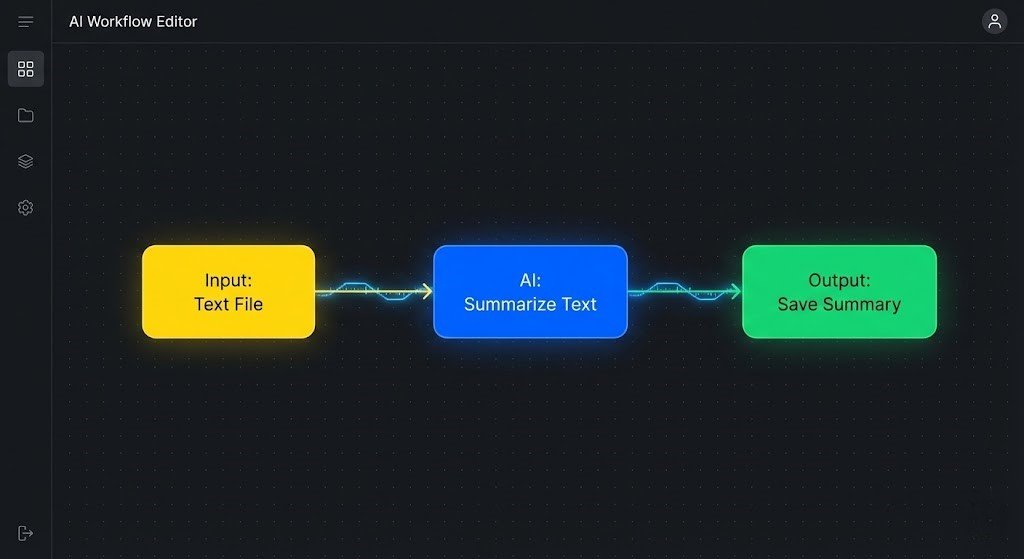
Opel (opal.google) is Google’s direct competitor to complex (and often expensive) tools like Zapier or n8n.
- The Use Case: You can build internal workflow apps by describing them. For example, a tool that takes a topic and generates 10 viral YouTube titles takes about 20 seconds to build.
- The Difference: While AI Studio builds public web apps, Opel creates internal tools to optimize your business operations.
3. NotebookLM: Turn Research into “Explainer Videos”
NotebookLM (notebooklm.google.com) recently added a “Video Overview” feature that is genuinely shocking.
- The Magic: Upload your research papers, strategy guides, or articles. NotebookLM will synthesize that information and render a full, high-quality explainer video with natural-sounding AI hosts.
- Customization: You can even give specific instructions on the tone and focus before generating.
4. Pamelli: Your AI Marketing Agency
Coming out of Google Labs, Pamelli acts as a full-service marketing department.
- How it works: Enter your website URL. Pamelli scans your site, pulls your brand colors, fonts, and voice, and then generates entire social media campaigns that are perfectly on-brand.
- Availability: Currently available for users in the US, Canada, Australia, and New Zealand.
5. Gemini Canvas: Text-to-Presentation
Located inside the main Gemini interface under “Tools,” Canvas turns boring text into professional slides.
- The Workflow: Upload a business plan or report and tell Gemini to “create a presentation.” It identifies key sections, generates visuals, and creates a logical layout.
- Exportable: Once you’re happy, you can export it directly to Google Slides for final edits.
6. Nano Banana Pro: Pro-Level Image Generation
Built into the Gemini interface, Nano Banana Pro is Google’s latest image model.
- Quality: It is competitive with tools like Midjourney, especially in rendering accurate text and realistic product mockups.
- Pro Tip: For more advanced controls like “temperature” settings, you can also access this model through Google AI Studio.

7. Multi-Speaker Audio: Studio Quality for Free
Finally, Google AI Studio now offers Multi-speaker audio generation.
- The Difference: Unlike single-voice tools, this creates dynamic, back-and-forth conversations between multiple speakers that sound incredibly natural.
- The Cost: While platforms like 11 Labs charge $20+ for this level of quality, it is currently free in the AI Studio “Speech” interface.
Conclusion: The Total Paradigm Shift
Google’s latest releases mark a significant shift in the AI landscape. You no longer need a massive budget to build apps, produce videos, or create studio-grade audio. By leveraging these seven tools, you can replace a dozens of paid subscriptions and focus your budget on what actually matters: growing your brand.
















Leave a comment